> For the complete documentation index, see [llms.txt](https://docs.skyone.cloud/llms.txt). Markdown versions of documentation pages are available by appending `.md` to page URLs; this page is available as [Markdown](https://docs.skyone.cloud/english/skyone-console/overview.md).
# Overview
**Skyone Console** is the unified platform that centralizes products, resources, and settings in a single environment. Through the platform, you have access to:
* Support center
* Quick access to contracts and invoices
* Intuitive management of profiles, users, and companies
* IT security and governance
* Real-time service status
* Updates and announcements
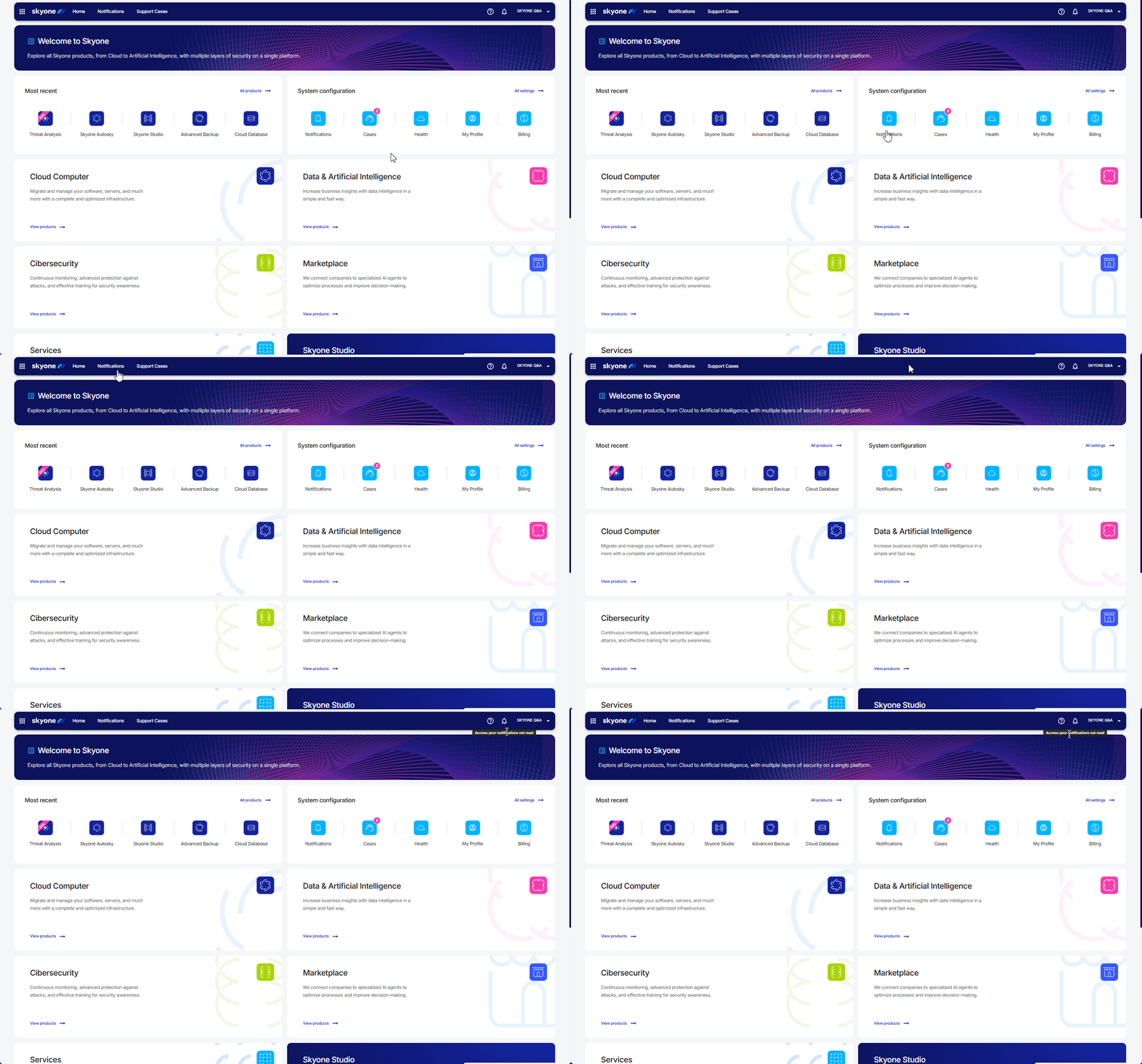
Upon logging into **Skyone Console**, you gain access to a range of **Skyone**’s products and resources. Here’s how to navigate the platform’s main sections:
### Product Menu
In the upper-left corner, you’ll find the product menu. Hover over each category to view the modules associated with each item.
When you click on any product, you’ll see a detailed description of its functionality. If you have an active contract, an "**Access**" button will be displayed for direct access to the product.
### Most recent
This section shows the most frequently used items, allowing quick access to key resources. To explore all available products and features, click on “**All options**”.
### System Configuration
Here, you’ll find the platform’s main settings, such as Notifications, General Settings, and Platform Status (Health).
{% hint style="danger" %}
Access to each feature is controlled by user permissions. If any item is not visible, contact your administrator to review your permissions.
{% endhint %}
### Notifications
View all platform notifications in one place to stay updated on news and alerts.
### Support Cases
Open and track support tickets easily and quickly.
## Highlights
Click on the product tiles to stay up to date with the latest news and platform updates, including relevant information about new features and improvements.
## **Blog**
By accessing the Blog section and clicking on the available posts, you'll gain insights into market trends and valuable perspectives from our experts on key industry topics.
Schedule a Demo
---
# Agent Instructions
This documentation is published with GitBook. GitBook is the documentation platform designed so that both humans and AI agents can read, navigate, and reason over technical content effectively. Learn more at gitbook.com.
## Querying This Documentation
If you need additional information that is not directly available in this page, you can query the documentation dynamically by asking a question.
Perform an HTTP GET request on the current page URL with the `ask` query parameter, and the optional `goal` query parameter:
```
GET https://docs.skyone.cloud/english/skyone-console/overview.md?ask=&goal=
```
`ask` is the immediate question: it should be specific, self-contained, and written in natural language.
`goal` is optional and describes the broader end goal you are ultimately trying to accomplish on behalf of the user. GitBook uses it to tailor the answer towards what is most useful for that goal.
The response will contain a direct answer to the question and relevant excerpts and sources from the documentation.
Use this mechanism when the answer is not explicitly present in the current page, you need clarification or additional context, or you want to retrieve related documentation sections.