> For the complete documentation index, see [llms.txt](https://docs.skyone.cloud/llms.txt). Markdown versions of documentation pages are available by appending `.md` to page URLs; this page is available as [Markdown](https://docs.skyone.cloud/english/skyone-studio/integrations/flows/data-operations/parameterization-rules.md).
# Parameterization rules
### Parameterization in Skyone Studio
Most of the calls used in connector modules are parameterized. This way you can use values from previous modules in a flow as execution parameters for subsequent modules. The parameterization and substitution of values follow a few rules.
***
### Parameters
When specifying a module, we define the external parameters it will receive. During the construction of a flow, we determine how these parameters will be populated by using values that are already available at the time the module executes.
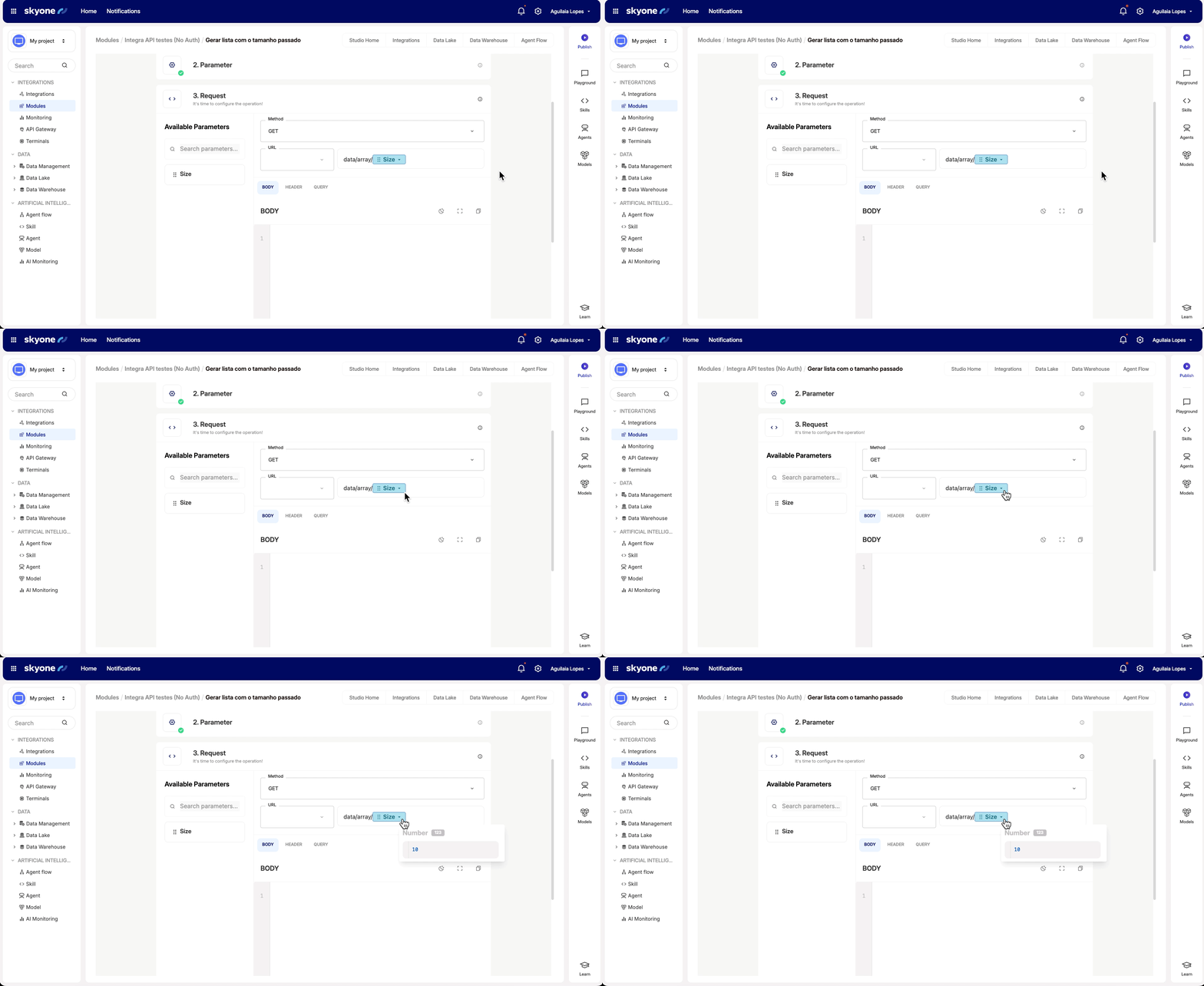
When building a module, we define parameters that must be filled with values provided at runtime for the module to execute correctly. For example, we might define a city identifier parameter for a REST module that requires this value in the URL call. This is done by placing a parameter placeholder in the position within the URL where the value should be inserted. In the example below, **"Size"** is a parameter. By clicking on it, you can view details about the parameter.
At flow runtime, Skyone Studio replaces the placeholder with the data specified during the flow's design. This data must be available in the flow’s execution data plan. The execution data plan consists of all data previously retrieved from earlier modules, as well as variables defined during the configuration phase.
When building a flow, you define which data will be used to populate each required parameter in every module.
In building the flow we associate data with the parameters of the modules
In the previous example, we can define that the value of **CityId** in a specific flow will be provided within of the **body** of the **webhook** that initializes the flow. When we are configuring this module in a flow, we need to determine which data will be mapped to which parameters. The screenshot below shows this configuration.
You will note that this module has two parameters to configure: **User-Key** and **CityId**. These are listed on the right side under *Parameter settings.* You can specify a statically parameter, as shown in **User-Key**. To do this, you should enter the needed value in the parameter.
However, it is more common to use dynamic values that are determined at each execution of the flow, as illustrated for the **CityId** parameter. In this example, it will always be filled at runtime with the **city\_id** value that comes in the **body** of the **webhook** that initializes the flow. Take note that on the left of the configuration screen we see the variables (Flow Parameters) as well as all the modules already executed and the data received in each module. In this case, we see the *Webhook Trigger* and have access to the content of its **body**, which contains the **city\_id** property that contains the needed value.
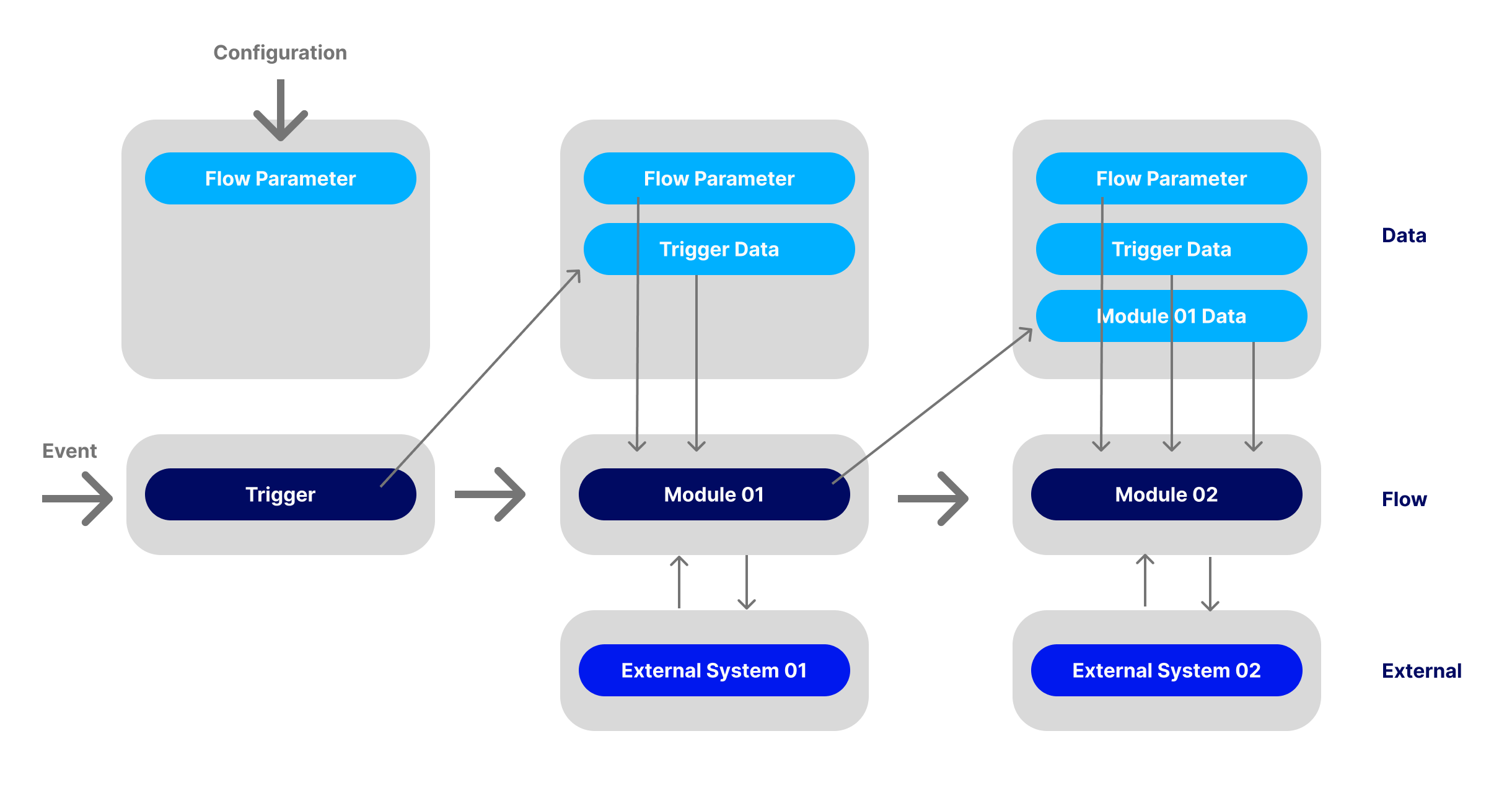
As the flow runs, the data plan receives all the data that the modules get. It becomes immediately available to be consumed by the parameters of subsequent modules.
Parameters along the execution of a flow
Observe that we start a flow only with the variables (Flow Parameters), which are value determined by the operator at setup time. Also, the external event itself can provide information, as is the case with a *webhook* or an API call. All these values are available in the data plan of the execution.
The first module after the Trigger has the variables (Flow Parameters) and any data that the Trigger returns to be used as parameter. This module can make data manipulations and eventually interact with some external system and obtain more data during the execution.
The second module that comes in the execution sequence can use all data obtained by the flow so far, which includes the variables (Flow Parameters), the Trigger information, as well as all data obtained by Module 01. This second module in turn can interact with external systems and also receive additional data that can be used by all the modules in the sequence. This process can happen for all modules of a flow.
{% hint style="info" %}
**In the case of loops, only the values of the last execution are available**
{% endhint %}
***
**Parameter Marking**
Parameters can be specified in various modules calls. We can have a URL of a REST request that uses a parameter, just as we can have a *query* to a database that is also parameterized.
To identify **Skyone Studio** parameters we use especific symbols that work as start and end markers. The content between these symbols identifies the name of the parameter. Example:
```
<>CityId
```
In this case, the name of the parameter is called **CityId** and the marking symbols are the major and minor signs. Every time that **Skyone Studio** finds this flag, it will replace these symbols with the current value of the parameter.
For example, in the REST request path bellow we find the specification of this parameter:
```
Cities/<>CityId
```
To execute this module, Skyone Studio will replace the parameter placeholder with the value of the data to be used. For example, if this value is **999999**, Skyone Studio will use the following path:
```
Cities/999999
```
***
**Parameter and Data Marking Types**
There are basically three types of marking that identify parameters and data in **Skyone Studio**:
| Tags | Description |
| ------------------------- | ------------------------------------------------------------------------------------------------------------------------------------------------------------------------------------------------------------------------------------------------------------------------------------------------------------- |
| <>parameter\ | **Parameter**: Parameter specification used during module construction. It's how we specify that certain values should be substituted for values provided at runtime. |
| {}module : parameter{/} | **Execution Data:** Data retrieved during a flow's runtime. Skyone Studio will replace the placeholder with the value of the data at the time of execution. The name of the data is a combination of the module’s identifier where it was generated and the name of the property. |
| \[]module : parameter\[/] | **Variables** These are values that the operator can define at setup time through the Flow Parameters. They are permanent variables and are therefore maintained between different executions of a flow. The **Update Parameter** module also allows a flow to directly change the value of a flow parameter. |
***
**Parameter Replacement**
It’s important to observe how parameters markers are replaced by data during the execution of a flow. **Skyone Studio** uses only the contents of the specified data to fill the parameter position.
Examples:
**String parameter in URL**
* Parameter Name: CityId
* Parameter Type: string
* Endpoint: baseURL/ Cities/<>CityId\
* Data: \[]GXpfha3Z : city\_id\[/]
* Data Type: string
* Data Content: “XXXXXXX”
* Replacement:
```
baseURL/ Cities/XXXXXXX
```
**String parameter in JSON body**
* Parameter: CityId
* Parameter Type: string
* Body: { “city” : “<>CityId\” }
* Data: \[]GXpfha3Z : city\_id\[/]
* Data Type: string
* Data Content: “XXXXXXX”
* Replacement:
```
{ “city” : “XXXXXXX” }
```
{% hint style="info" %}
In order for the strings in the final object to include quotation marks, you must add them manually in the Body definition. Skyone Studio does not automatically add quotation marks to strings.
{% endhint %}
**Object parameter in Data Transformation**
* Parameter Name: DATA
* DATA Example:
```
{ “resp_body” : {}trigger : body{/} }
```
* Data: {}trigger : body{/}
* Data Type: object
* Data Content:
```
{ "city_id":"0987654321" }
```
* Replacement:
```json
{
“result” : {
"resp_body" : {
"city_id" : "0987654321"
}
}
}
```
{% hint style="info" %}
Skyone Studio inserts a property called **`result`** as the base of the referenced data.
{% endhint %}
{% hint style="info" %}
You can pass multiple parameters to a *Data Transformation*. Just set up a DATA using an object with multiple properties, each referencing a parameter.
{% endhint %}
---
# Agent Instructions
This documentation is published with GitBook. GitBook is the documentation platform designed so that both humans and AI agents can read, navigate, and reason over technical content effectively. Learn more at gitbook.com.
## Querying This Documentation
If you need additional information that is not directly available in this page, you can query the documentation by asking a question.
Perform an HTTP GET request on the following URL with the `ask` and `goal` query parameters:
```
GET https://docs.skyone.cloud/english/skyone-studio/integrations/flows/data-operations/parameterization-rules.md?ask=&goal=
```
`ask` is the immediate question: it should be specific, self-contained, and written in natural language.
`goal` is what the user is ultimately trying to achieve, the reason they need the answer. Sharing it helps GitBook give you a better, more relevant answer. A goal is most helpful when it describes the outcome the user wants rather than restating the question. For example, with `ask=how do I create an API token`, a goal like `automate deployments from our CI pipeline` lets GitBook tailor the answer to that use case.
The response will contain a direct answer to the question and relevant excerpts and sources from the documentation.
Use this mechanism when the answer is not explicitly present in the current page, you need clarification or additional context, or you want to retrieve related documentation sections.